Ensure every caller reaches the right expert without letting calls go unanswered. Seamlessly route calls to the right team, department, or phone devices with SanCCS Smart Call Forwarding. Book your free demo to understand how the call forwarding system works for your business.

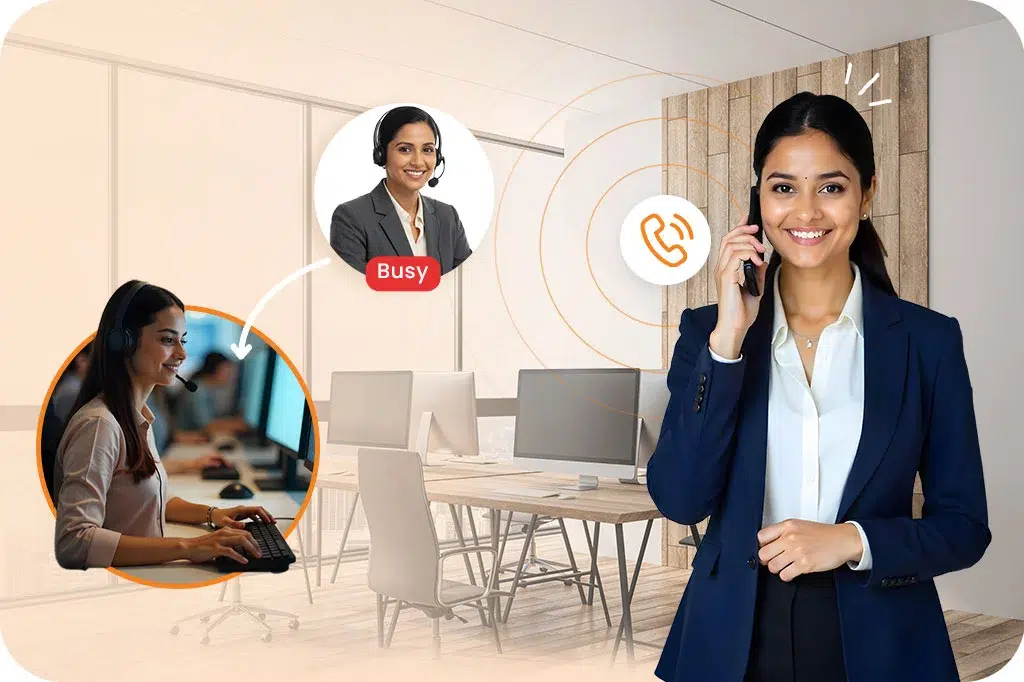
Call forwarding ensures that your customers aren’t left waiting on hold. Forward your calls automatically to available agents or departments. It provides a professional, reliable service that builds long-term trust.

Whether your team is working from home or any location. SanCCS Call forwarding service keeps the call reachable to your agents at any device they are using.

Avoid expensive devices or on–site devices. Call forwarding allows you to manage all global or local calls through a cloud-based system. It reduces overhead while maintaining a high-end business image.

Don’t let your skilled team be loaded with general enquiries. Use flexible rules for call forwarding which keeps the team productive even when they are away from their desk.

With an automated time-based call forwarding system its routes calls to the staff outside the business hours to maintain 24*7 service. It helps your clients understand that your digital doors are not closed.

Reduce missed opportunities by forwarding calls to available agents. It quickly finds free agents and connects calls without any delay. It ensures that your callers can reach your agents anytime without delay.

An IVR system automates call routing by guiding callers through a menu to teams, department or specific agents. It forwards calls to the right agent even after working hours or while working remotely. An IVR system or auto attendant gives your business a voice from the first ring, ensuring no person interruption.
Automated call distribution (ACD) intelligently routes incoming calls to specific agents or departments based on skill sets or availability.Its an advanced call forwarding system, the ACD system understands callers' data and needs direct calls to a specific queue. It minimizes wait time and optimizes agent workload.
Multi-device forwarding is call management, which routes incoming calls to any device. So your team stays close to work anywhere across the world. This way of call forwarding ensures increased accessibility, productivity, and flexibility.
Music on hold is a professional audio or brand message played during transfers. This minimizes wait times and prevents hand-offs. It also ensures callers stay engaged until the call is forwarded to the right agent.
Roaming and remote extensions are a part of the cloud telephony system that enables call forwarding to employees working remotely. It allows users to maintain a professional image by forwarding business calls to any device. Roaming and remote extensions don’t reveal personal contact information.
Call screening identifies and evaluates calls using the caller's ID to determine whether a call should be answered, forwarded, or blocked. Call screening acts as a filter before call forwarding, helping you send important calls to the right numbers. It also stops spam calls before they reach you.
The rules below will help you configure the call forwarding settings as per your business needs:

It automatically forwards incoming calls to a designated number. This auto call forwarding option is best for agents who are on vacation or working from home. With this, your agent can take calls on a cell phone.

It selectively routes calls to specific numbers based on predefined criteria. This is an automatic call forwarding option where only key clients can reach the mobile phone, while other calls go to voicemails.

It automatically redirects calls to another number when your agent's line is busy or in DND mode. With this call forwarding option, the callers won’t get a busy signal as the system quickly redirects them to another suitable devices.

The call is forwarded to another number if unanswered after a set of rings. This call forwarding option helps prevent callers from landing on voicemail and connects them with another person.

This option diverts calls to a backup number if your initial number is unavailable due to an outage. This call forwarding method helps your agent deliver support continuously, even in testing circumstances.

It redirects calls from a specific geographic area to another office during localized outages. With location forwarding, you can configure your cloud telephony to divert all calls within that area to devices in another office with a different local area code.
Auto call forwarding software is used by businesses of all sizes, especially those with remote teams, multiple locations, or high call volume. It ensures that all calls are answered properly.
A call forwarding system is a telecommunications feature that redirects incoming calls from one number to another. Whether you are using a desk phone, mobile, or computer, it ensures that your business stays connected. It is an essential tool for teams that need to stay reachable while away from their primary office location or desk.
Automatic call forwarding uses pre-set rules to redirect calls without any manual effort. When a call comes in, the software identifies where it should go based on your settings—such as time of day or agent availability. The call is then instantly sent to the designated phone or department, ensuring the caller is never left waiting.
Call forwarding software improves business efficiency by making sure no lead is lost. It allows your team to work remotely while appearing professional to the caller. By using software instead of traditional hardware, you can easily manage routing rules, track call data, and ensure that every customer inquiry is handled by the right team member.
Yes, our call forwarding service allows for multi-device routing. You can set the system to ring your office phone, mobile app, and laptop simultaneously. This feature is perfect for busy professionals who move between meetings or locations, as it allows you to pick up the conversation on any device is most convenient at that moment.
Manual forwarding requires you to physically change settings on your device each time you leave your desk. In contrast, auto call forwarding handles the process for you based on your business hours or employee status. It is a much more reliable way to manage high call volumes and ensures that human error never leads to missed opportunities.
Absolutely, call forwarding is a vital tool for remote and hybrid teams. It allow employees to receive office calls on their personal or company-issued mobile devices without sharing their private numbers. This maintains a professional image for the company while giving your staff the flexibility to work effectively from any location with an internet connection.
No, because our system is cloud-based, it is very cost-effective. You do not need to buy expensive hardware or pay for complex wiring. The service is managed through an easy-to-use digital interface, reducing maintenance costs. It saves you money in the long run by ensuring you never miss a revenue-generating call from a potential client.
Setting up your service is simple and fast. Through the SanCCS dashboard, you can enter the numbers you wish to forward calls to and create your routing rules. You can choose to forward all calls, or only those that go unanswered after a few rings. Once saved, the system begins redirecting your calls instantly and automatically.
SAN Softwares is a company dedicated to providing complete software solutions to Corporate and end-user customers.
© 2026 SAN Softwares Pvt Ltd | All Right Reserved
Enter your details and captcha to start the call